Cloudflare FAQ
💡 Recommendation: Use Full Zone whenever possible for the best experience and full feature support.
Cloudflare FAQ
🌐 DNS & Domain Setup
After adding domains, the status is PENDING for a few hours 🔗
Prerequisites:
- DNSSEC must be disabled at the current NS provider before switching
- NS records must only include the Cloudflare name servers; remove all existing NS records
Tips:
- The activation process may take up to 24 hours, so allocate buffer time. Don't wait until the last minute to add the domain.
- For partial (CNAME) zones, DNS TXT records may not be fully populated. Clearing DNS cache at 1.1.1.1 Purge and Google DNS Cache might speed up the process.
What is the difference between Full Zone and Partial (CNAME) Zone? 🔗
| Full Zone | Partial (CNAME) Zone | |
|---|---|---|
| NS Change | Required — point NS to Cloudflare | Not required — keep existing NS |
| DNS Management | Managed in Cloudflare Dashboard | Managed at original DNS provider |
| Setup | Change NS records at registrar | Add CNAME records at current provider |
| Feature Support | Full feature set | Some features limited |
| Use Case | Most common setup | When NS migration is not possible |
💡 Recommendation: Use Full Zone whenever possible for the best experience and full feature support.
Can Cloudflare support wildcard DNS records? 🔗
Yes. Cloudflare supports wildcard (*) DNS records. On Enterprise plans, wildcard records can be proxied (orange-clouded). On Free/Pro/Business plans, wildcard DNS records are supported but will be DNS-only (grey-clouded).
🔧 POC & Onboarding
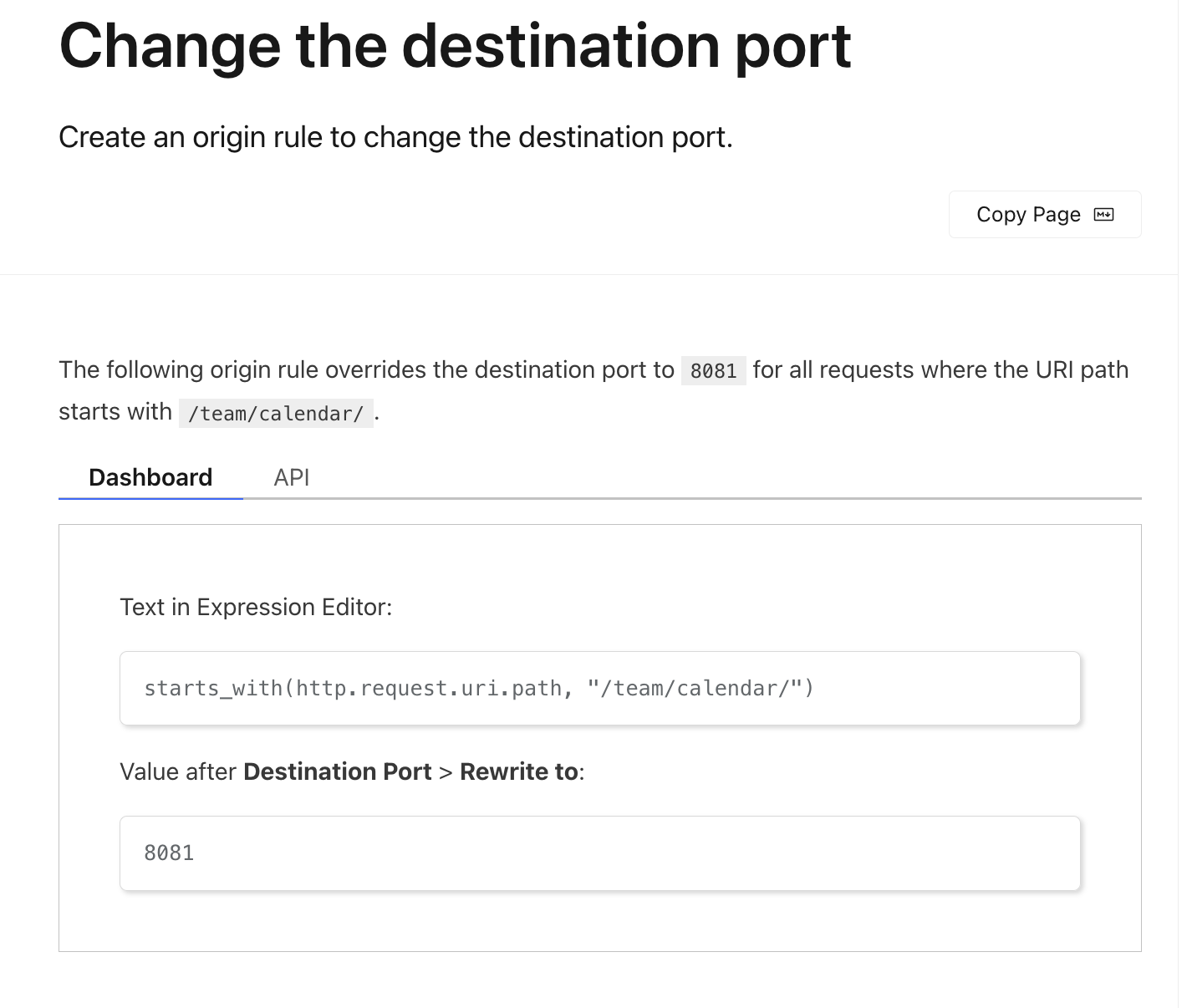
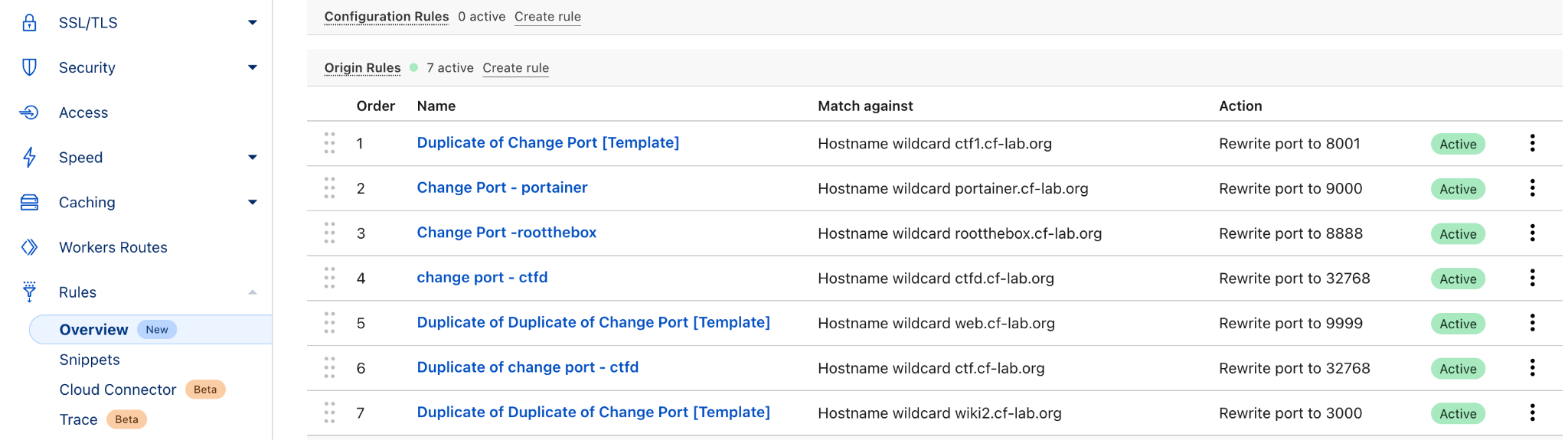
Customer is using a custom port — how to configure? 🔗
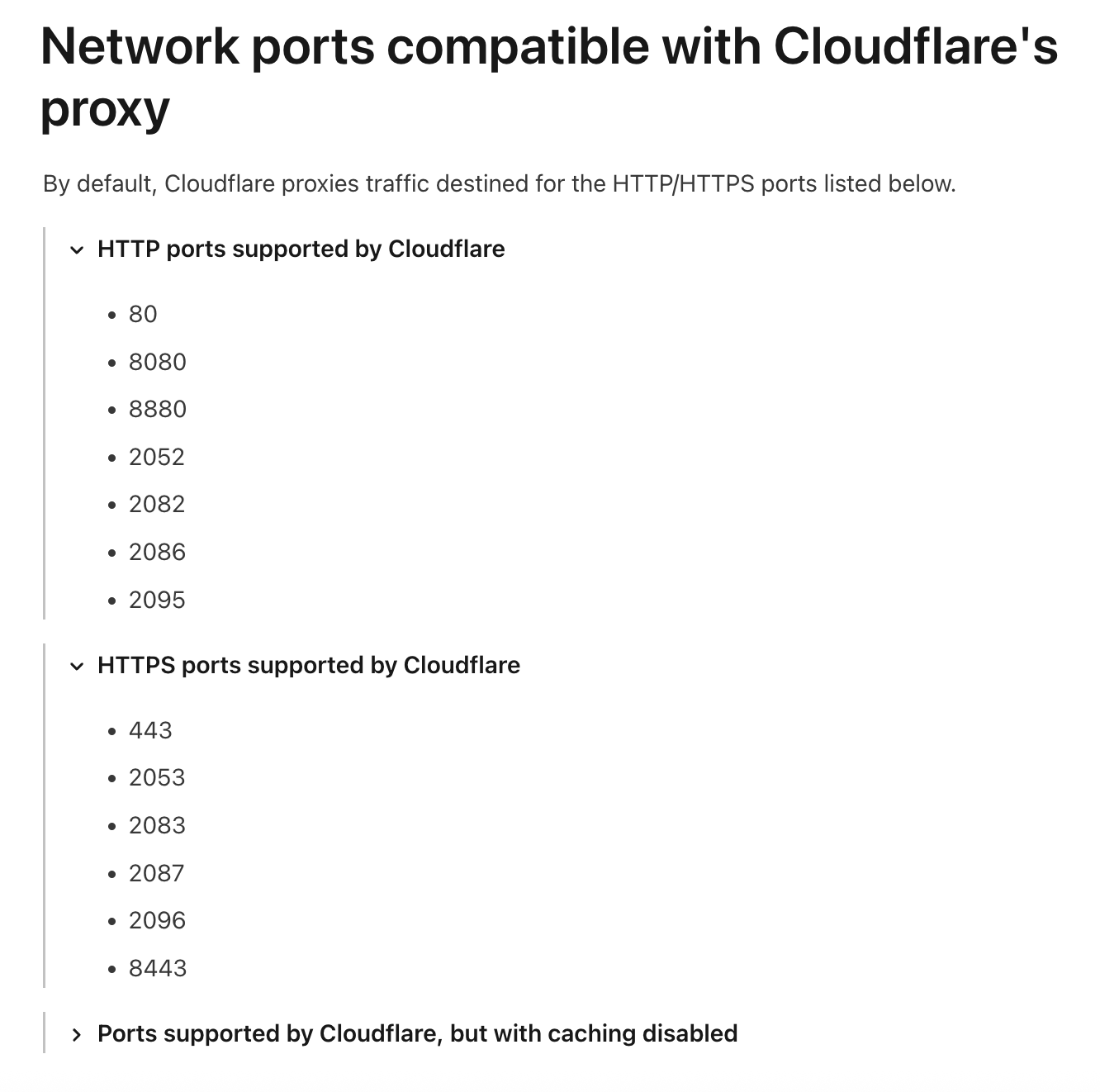
Cloudflare only proxies traffic on specific ports by default:
HTTP: 80, 8080, 8880, 2052, 2082, 2086, 2095
HTTPS: 443, 2053, 2083, 2087, 2096, 8443
For non-standard ports, options include:
- Cloudflare Spectrum (Enterprise) — proxy any TCP/UDP port
- Origin Rules — rewrite the destination port at Cloudflare's edge
- Workers — programmatically route to custom origin ports
How long does a typical POC take? 🔗
A standard POC usually runs 2–4 weeks, depending on scope:
| Phase | Duration | Activities |
|---|---|---|
| Preparation | 2–3 days | Domain setup, DNS migration, baseline metrics |
| Configuration | 3–5 days | WAF rules, caching, security policies |
| Testing | 1–2 weeks | Traffic routing, performance benchmarking, attack simulation |
| Review | 2–3 days | Results analysis, report generation |
💡 Cloudflare's SE team can assist throughout the POC process.
Does the customer need to change their origin server during POC? 🔗
No. Cloudflare operates as a reverse proxy — traffic flows through Cloudflare to the existing origin. The origin server configuration stays the same. The only change required is pointing DNS to Cloudflare.
🛡️ Security (WAF, DDoS, Bot)
What is the difference between WAF Managed Rules and Custom Rules? 🔗
| Managed Rules | Custom Rules | |
|---|---|---|
| Source | Maintained by Cloudflare's security team | Created by customer |
| Updates | Auto-updated with new threat intelligence | Manual maintenance |
| Use Case | OWASP Top 10, known CVEs, common attacks | Business-specific logic, geo-blocking, rate limiting |
| Action | Block, Challenge, Log | Block, Challenge, Skip, Log, etc. |
💡 Best practice: Enable Managed Rules as baseline + add Custom Rules for specific business needs.
Does Cloudflare DDoS protection require manual intervention? 🔗
No. Cloudflare's DDoS protection is always-on and automatic. With a network capacity of 321+ Tbps, Cloudflare can absorb even the largest attacks. L3/L4 DDoS mitigation is included in all plans. L7 DDoS mitigation is available on all plans with configurable sensitivity levels.
Can Cloudflare protect non-HTTP traffic (L3/L4)? 🔗
Yes, via Magic Transit (for IP-level / network protection) and Spectrum (for individual TCP/UDP applications). These are Enterprise-level products designed to protect gaming servers, mail servers, custom protocols, and more.
⚡ Performance & CDN
How does Cloudflare caching work? What gets cached by default? 🔗
By default, Cloudflare caches static resources based on file extension (e.g., .js, .css, .png, .jpg, .gif, .ico, .svg, .woff2).
HTML pages are NOT cached by default. To cache HTML or dynamic content, use:
- Cache Rules — fine-grained control over what to cache
- Page Rules (legacy) —
Cache Everythingsetting - Workers — programmatic cache control via the Cache API
💡 Use
Cache-ControlandCDN-Cache-Controlheaders from origin to fine-tune TTL behavior.
What is Tiered Cache and when should it be enabled? 🔗
Tiered Cache adds an intermediate caching layer between Cloudflare edge and origin. Instead of every edge data center requesting content from origin on a cache miss, the request goes to a regional hub first.
Benefits:
- Reduces origin load significantly
- Improves cache hit ratio
- Lowers bandwidth costs
💡 Recommendation: Always enable Tiered Cache — especially for origins with high bandwidth costs (e.g., AWS, GCP).
Does Cloudflare support WebSocket? 🔗
Yes. Cloudflare supports WebSocket connections on all plans. WebSocket traffic is proxied through Cloudflare and benefits from DDoS protection. On Enterprise plans, Spectrum can also proxy WebSocket on custom ports.
🔒 Zero Trust & SASE
What is the difference between Cloudflare Access and Gateway? 🔗
| Cloudflare Access | Cloudflare Gateway | |
|---|---|---|
| Purpose | Application-level access control (ZTNA) | Internet traffic filtering (SWG) |
| Protects | Internal/SaaS apps | Users browsing the internet |
| How | Identity-aware proxy per app | DNS/HTTP/network filtering |
| Use Case | Replace VPN for app access | Block malware, phishing, data loss |
💡 They work together as parts of Cloudflare One (SASE platform).
Can Cloudflare replace our VPN? 🔗
Yes. Cloudflare Access + WARP client can replace traditional VPN for most use cases:
- Per-app access control (vs. full network access)
- Identity-based policies (IdP integration)
- No inbound connections to corporate network
- Better performance (no hairpinning through a VPN concentrator)
- Works for both web apps and non-HTTP resources (SSH, RDP, SMB)
💰 Licensing & Plans
What are the Cloudflare plan tiers? 🔗
| Plan | Price | Key Features |
|---|---|---|
| Free | $0 | Basic CDN, DDoS, DNS, limited WAF |
| Pro | $20/mo | WAF Managed Rules, image optimization |
| Business | $200/mo | Custom WAF rules, SLA, priority support |
| Enterprise | Custom | Full feature set, dedicated support, SLA, Spectrum, Argo, etc. |
💡 Most partner deals focus on Enterprise plans with annual contracts.
How does Cloudflare count billable domains/zones? 🔗
Each zone (domain) on Cloudflare counts as a separate billable unit. Subdomains under the same zone do not incur additional zone charges. However, some add-on features (e.g., Rate Limiting, Argo) may be billed based on usage (requests, bandwidth).
Can multiple domains share one Enterprise contract? 🔗
Yes. Enterprise contracts often cover multiple zones under a single agreement. The pricing is typically based on total traffic volume and feature set rather than per-zone pricing.
附件
- 📎 AGV_vUeAv8RMJAzE46MKiH4RFmie3pzi7sgZwyaRfaXG-pojV2pc22vjiqwOCWStHmpLSXAR-gfzsT6quU_4lTFlWn1Sa0CK1cm_.png (126 KB)
- 📎 AGV_vUcwCwfCr6WDUqi9wbvKuZ5UUUnfzwaDcPEXCbxNuGU-G1wri43-QKglWR58h2yiQwOspNyHoju-OQF7XABDxcXRFhDBnddz.png (142 KB)
- 📎 AGV_vUfSatxS6-fpW-r9Wr2qYyqpC23RV_Xa4gqC_w91rdzAgqlOf03aHHSdtD-4LOULb5dJZRPjKQ6FdqQiIq7L9d3zYEEQ_TAs.png (240 KB)